Enter and update a dependent's benefit eligibility status or update a dependent's PHI Any health information that could identify a person. This can include a person's past or present medical status or condition, payments made for health care, and health care services received. disclosure status. Add, update, or delete a dependent's eligibility to receive benefits (such as Medicare).
Access the Effective Dates tab for a dependent
- Search for and open the dependent to update.
-
Click the
Effective Datestab. Dependent Effective Dates field descriptions
* indicates a required field
Field Description Status Effective Dates From Date The date the dependent could be covered by the member's benefits.
- This isn't necessarily the date the dependent becomes eligible for benefits.
- The from date can't be before the dependent's birth date.
- Click
 and select a date or enter a date in
 MM/DD/YYYYformat.
- If the dependent's relationship to the dependent is a dependent (rather than member, spouse, or other), the from date will be the same as the dependent's birth date.
Start Code A code that identifies the event or reason for the start of the dependent's eligibility. A start code is required when you enter a from date.
If the dependent's relationship to the dependent is a dependent (rather than member, spouse, or other), the start code will be set to
B—Birth.Through Date The last date the dependent is covered by the member's eligibility.
- This date must be after the from date. Click and select a date or enter a date in
MM/DD/YYYYformat. - If you change the dependent's birth date, relationship, or termination method, this might affect the dependent's through date.
- If you set this date to be the same as the From Date and the Dependent Status Code parameter
Remove Eligibility when From Date Equals Through Dateis set toYes, the dependent won't be eligible for that day.
Term Code A code that represents the event or reason for end of the dependent's eligibility. This is required when you enter a through date. Action Date/Time The date and time an operator added the status effective date range. Operator The name of the operator who updated the status effective dates. Disclose PHI Effective Dates Effective Date The date that the PHI
Any health information that could identify a person. This can include a person's past or present medical status or condition, payments made for health care, and health care services received. disclosure status becomes effective.Expiration Date The date the PHI disclosure status expires.
Override Flag The reason the default PHI value was overridden and can be disclosed. By default, the PHI value is set to
No.A—Allow Disclosure.E—Emancipation.
Add a status effective date
- Click
 below the effective dates table.
 - Enter the dependent effective date information.
-
Click
 to update the table information.
 -
Click
 to save.
Update a dependent's effective dates
- Select the effective date row to update.
- Make changes to the effective date information fields as necessary.
-
Click
to update the table information. -
Click
to save.
Delete a dependent's effective dates
- Select the effective date row to delete.
-
Click
 to delete the row from the table.
 -
Click
to save.
Y, you're prompted for the Dependent Effective Date after clicking when adding or making changes to a dependent's effective dates.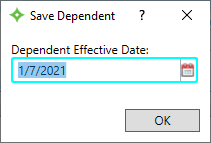
- If the dependent's start date is their date of birth, and the Term Status is selected, the Dependent Effective Date will default to the dependent's date of birth.
- If the dependent's start date isn't their date of birth, the Dependent Effective Date will be the From Date defined.
- If the dependent isn't a type D or there is no Term Status selected, the Dependent Effective Date will default to the current date.
- The Dependent Effective Date can be updated.
Dependent's PHI disclosure status
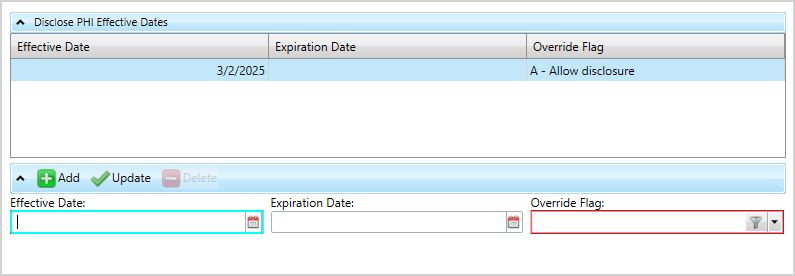
Edit a dependent's PHI Any health information that could identify a person. This can include a person's past or present medical status or condition, payments made for health care, and health care services received. disclosure status that displays in the demographics side panel tile. The PHI disclosure status is set to No by default, but can be changed to Yes by setting the override flag. This override flag will allow the disclosure of the dependent's PHI for a defined time amount. See Can I discuss a dependent’s claim with a member?
Add a PHI disclosure status
- Click below the PHI disclosure table.
-
Enter the dependent
Effective Date,Expiration Date, andOverride Flag.Note: The effective date range (from and through dates) of one row can't overlap the effective date range of another row. -
Click
to update the table information. -
Click
to save.
Update a PHI disclosure status
- Select the PHI Any health information that could identify a person. This can include a person's past or present medical status or condition, payments made for health care, and health care services received. disclosure row to update.
- Make changes to the dependent
Effective Date,Expiration Date, andOverride Flagas necessary. -
Click
to update the table information. -
Click
to save.
Delete a PHI disclosure status
- Select the PHI disclosure to delete.
-
Click
to delete the row from the table. -
Click
to save.